


Lately, I have been watching some profitable EA are built based scalping strategy. It seems EA programmers found that this strategy is easy to optimize and bring good result. But there is a opinion that backtest process for this forex strategy is not valid since most of this strategy use tight TakeProfit. Backtest process can be done in MetaTrader platform maximum for 1 Minute. As we know, there is a lot of price change in that time.
I am still remember for a scalping EA which won in top 5 of Automated Forex Trading last year. The result is very promising. Even the 1st place can't beat its winning percentage. So, scalping EA can be the one of the winning robot but I think it will need regular optimization.
For sample of scalping EA, there is a famous EA called Shark. Shark was very famous a few month ago until it performance began to drop in May. The author has release the new version of Shark and I hope this can replace the previous version weakness. And then now comes a new scalping EA called Scalper Eur/Usd and Scalper Usd/Jpy. I am still following their latest results and have a great hope that these EAs will be ones that I was looking for. If you want to find further information about these two EAs, please check them at www.forexgallery.com


There are two different side of traders, one who loves simple strategy and the other who rather to choose complicated. They have their own advantages and disadvantages. From my experience, simple strategy is easy to use and doesn't need much interpretation. Of course, sometimes they give more false signal than the complicated system. The other side, complicated system give less false signal. They are harder to use and need a lot of interpretation and exercise.
But whatever strategy we are using, our destination is profit. So, what is yours chooice? Simple or Complicated?
If you have read my previous posts about starting an automated online forex trading system, then you should read this post because this is the end of all our discussions. So, the last question is how much Return Of Investment (ROI) that we will get for this automated system? We must take care of our trading as investment, so don’t lose it and count the profit.
Total Cost for Starting Automated Online Forex Trading System :
| Investment | Cost |
| VPS by CNS (16 months) | $30 * 16 = $480 |
| Expert Advisor (I recommend Shark EA) | $269 |
| Fees for Wire Transfer | $30 |
| | |
| Total Cost | $779 |
Profit Calculation for Shark Based on 2007 Performance
(live trading from January 15, 2007 until April 17, 2008).
Initial Balance = $9,100 ;
Total Profit = $84,428 ;
Balance = $93,528.
ROI = $93,528 / $9,100 = 10.27
Profit Calculation (Based at ROI = 10.27 for 16 months)
| Initial Balance | $1,000 | $2,000 | $5,000 | $10,000 |
| Balance | $10,270 | $20,540 | $51,350 | $102,700 |
| Cost | -$779 | -$779 | -$779 | -$779 |
| Net Profit | $9,491 | $19,761 | $50,571 | $101,921 |
This is a good plan for diversification of our financial investment. Remember, don’t throw all your eggs in one basket, including forex trading.
Have a nice day!
Link for VPS : CommercialNetworkService
Link for Shark EA : Forexeasystems
PS : If you have plan to trade with Shark EA, I suggest you to use the same broker with the owner because the live result from the website is using FXDD. And if you are still doubt about performance of Shark EA, you may check the opinion from independent EA reviewer at here.
Here we are, the main part of Automated Online Forex Trading System. This is the brain of all components… like the driver of a car. Until this post, we already knew about reliable VPS for traders and how to select a broker for automated trading. I hope you already understood those previous articles, so this main section would be easy to follow.
Ok, I will explain how to choose a good, safe, and profitable Expert Advisor. Before we continue, I think it’s better to know the common terms that is used to read the result of an EA. Below are the terms :
- Initial deposit — the amount of initial deposit;
- Total net profit —financial result of all trades. This parameter represents the difference between "Gross profit" and "Gross loss";
- Gross profit — the sum of all profitable trades in monetary units;
- Gross loss — the sum of all unprofitable trades in monetary units;
- Profit factor — the ratio between the gross profit and the gross loss in per cents. One means that these sums are equal;
- Expected payoff — mathematical expectation of win. This parameter to be calculated statistically represents average profit/loss factor of one trade. It can also be considered as showing the expected profitability/unprofitability of the next trade;
- Absolute drawdown — the largest loss is below initial deposit value;
- Maximal drawdown — the largest loss of the local maximum in the deposit currency and in per cents of the deposit;
- Total trades — total amount of trade positions;
- Short positions (won %) — amount of short positions and the profit percentage thereof;
- Long positions (won %) — amount of long positions and the profit percentage thereof;
- Profit trades (% of total) — the amount of profitable trade positions and their part in the total trades, in per cents;
- Loss trades (% of total) — the amount of unprofitable trade positions and their part in the total trades, in per cents;
- Largest profit trade — the largest profit among all profitable positions;
- Largest loss trade — the largest loss among all unprofitable positions;
- Average profit trade — average profit value within a trade (sum of profits divided into the amount of profitable trades);
- Average loss trade — average loss value within a trade (sum of losses divided into the amount of unprofitable trades);
- Maximum consecutive wins (profit in money) — the longest series of profitable trade positions and sum of their wins;
- Maximum consecutive losses (loss in money) — the longest series of unprofitable trade positions and sum of their losses;
- Maximal consecutive profit (count of wins) — the maximal profit within one series of profitable trades and the corresponding amount of profitable trades;
- Maximal consecutive loss (count of losses) — the maximal loss within one series of unprofitable trades and the corresponding amount of unprofitable trades;
- Average consecutive wins — average amount of profitable positions in consecutive profitable series;
- Average consecutive loss — average amount of unprofitable positions in consecutive unprofitable series.
In case we are checking a result from backtesting process from an EA, it should give high modeling quality usually 90%. It means that the backtesting process is almost same as real trading process. High modeling quality can be only get with tick by tick method of backtesting process.
O.K., let’s continue to next part. Selecting a good and profitable Expert Advisor can be done based on backtest and/or live test result. The higher priority is live result. Meanwhile, backtest is still being a debate by many coders since the result can be different from live result even is done in the same period. But remember, even live results can’t guarantee that EA’s will be profitable in the future because no one can predict the future (lol).
The main factor for selecting EA is it must profitable. If that EA isn’t, why we should choose it (lol). Yes, to check whether EA is profitable enough, we can see the Profit Factor and Profit Trades (% of Total). The bigger these value mean EA is more profitable.
What about selecting a relative safe EA? This can be done by checking the value of profit factor, absolute drawdown, maximal drawdown, maximum consecutive loss (in money and count of losses) and average consecutive loss. The bigger value of absolute DD, maximal DD, and maximum consecutive loss mean that EA is not safe. From my experience as an EA’s coder, I prefer EA’s that has fixed StopLoss (SL) in intial order. Why? Because we know from the beginning how much that we will accept unlikely loss trades.
One more thing, if you use or buy an Expert Advisor, it is better if you know the strategy behind the EA because we can guess the risk factor. For example, when I know an EA is using martingale system, I can guess it is very risky.
Finally, a good EA at least should meet these requirements :
- Has Live Testing Result and High Modeling Quality Backtesting Result
- Lower Value of Absolute DD, Maximal DD, and Maximum Consecutive Loss
- Has Fixed StopLoss (SL)
- A Safe Trading Strategy(s)
- Have Customer Support and Free Update Version
- Money Back Guarantee would be nice
Some people are selling EA’s online but you must be careful when buying their products. Make sure that they can provide you with those criteria above. A good example EA seller is forexeasystems.com. He provides his buyers with backtesting result and live testing result, too. He even provides money back guarantee for people who buy his products.
Let's try to analyze the result from forexeasystems.com
Summary of Testing:
| EA Name | Shark | |
| Back Test Result | | |
| Test Period | 01/1999 – 03/2008 | 01/1999 – 03/2008 |
| Risk Per Trade (%) | 2 | 2 |
| Max DrawDown (%) | -4.66 | -7.11 |
| Profit Trades (%) | 84.96 | 89,10 |
| Intial Amount (US$) | 10,000.00 | 10,000.00 |
| Total Profit (US$) | 4,677,818.64 | 635,058.25 |
| Live Test Result | | |
| Test Period | 01/10/2007 – 03/12/2008 | 09/06/2007 – 03/11/2008 |
| Deposit/Withdrawal (US$) | 9,100.00 | 5,000.00 |
| Closed Trade P/L (US$) | 59,708.00 | 5,542.00 |
| Floating P/L (US$) | 0 | 0 |
| Balance (US$) | 68,808.00 | 10,542.00 |
| Link to website |
source :
shark backtest result : here
shark live trade result : here
griffin backtest result : here
griffin live trade result : here
From the backtest result, we can find out that even Griffin EA has higher profit trades (89.10%), it also has higher drawdown (7.11%) compared to Shark EA at same risk (2% per trade). Then we should check out total profit both of them and find out that Shark EA is much better than Griffin EA. In forward test, Shark and Griffin seem profitable enough but I prefer to use Shark EA since it has proven in longer period.
Ok, now I hope you already understand how to start your own automated forex trading system. But please be aware that forex trading is very risky business. As always said in forex broker's website, risk is your own responsibility.
In previous post, I have explained about reliable VPS. After choosing the right one, then we are going to the next step. This time we will select some good forex broker companies that suitable for Automated Forex Trading. Why do I choose this topic? That’s because not all forex brokerage are using a same trading platform. There are Meta Trader 4, Ninja Trader, Virtual Trader (VT), Trading Station, Trade Decision, etc. Not all of them can be setting for automated trading. One of platform that supports automated trading is
So, now we know that platform is important thing in automated trading. The reason why we choose Meta Trader 4 is almost 90% of retail brokers use this platform. Most traders develop their automated trading robots in MQL, computer language that is developed by Metaquotes exclusively for Meta Trader 4 Automated Trading. Robot that is developed in MQL is called Expert Advisor (EA).
Many retail brokers use Meta Trader 4 as their trading platform. Help me, I am confused because there are a lot of…. How I can find the right one? Yes, there are some requirements that should be provided by the broker for automated trading. I will list that below :
- Allow Automated Trading. Broker should activates the automated trading menu in MetaTrader 4 Platform. Yes, not all broker accept trading by robots. Even MetaTrader 4 support that function, broker still can choose to activate it or not. So, you must confirm this issue to your broker before using Expert Advisor.
- Fast Execution. Many brokers don’t support this criteria. Delay for opening or closing trades can make our profit become smaller and causing problems for Expert Advisor. So, we can make deposit for a very little money to try the execution speed of the broker.
- Use Filtering Price. Price data (or tick data) is sent by broker to our computer every time if there is any changes in the market. Some broker don’t use filter for this data, so tick data that comes to our computer is moving so fast. This can makes a problem for manual even for automated trading. Smooth price moving is good for Expert Advisor.
- Have Micro Account. Let say we have a profitable Expert Advisor, so we want this EA to trade in our live account. But we don’t know the capability of this EA exactly before placing it at live trading for real money. Some of us may think to try EA in demo account to test it. What I can say is the result won’t be same as live account using real money. Why? Because the tick data for demo account is different from live. So, we want to test this EA in live account but don’t want to loss a lot of money. The solution is using in micro account where 1 points = $0.01. Just for a little money to deposit and we can test EA in live account.
- Non Dealing Desk. This is an additional criteria to select good broker for automated trading. In Non Dealing Desk feature, orders are handled by computer so they will be executed very fast. This won’t be seen in manual handling by human operators. So, if broker has this feature, it will be an added value for them.
- Support High Leverage. If we try with a little money, then we must consider to use high leverage. This will reduce our deposit and margin use.
- Support Many Payment Processor. If we want to deposit for a little money, actually we don’t want to pay for expensive transfer fees, right? So, try to find a broker that support many payment processor because that will reduce the transfer fees.
If you have any suggestions for improving this article, please don’t hesitate to write your comment in this post. Thanks for reading my blog and please visit often because you will find a lot of good article about automated forex trading in here.
Many friends of mine often ask me about how they can start a full automated online trading system in forex. Yes, every trader dreams about automated trading that will release them from this routine activity. Even that they are succesful traders in manual trading, they know that someday they will have to go and let robot to replace their position for trading.
Everyone dreams about retire young. So, in order to get relax in Bahama’s Islands (LOL), we must start to set up a full automatic online trading system and the most important thing is this system must be profitable. Why we would set up an automated trading system if this doesn’t bring us a lot of money. So, I will help people to start a profitable system.
What do we need to set up an automated online trading system ?
- Superb VPS (Virtual Private Server) that is set up specially for automated trading
- Broker Company that provides MetaTrader 4 Platform especially support micro account
- Profitable Expert Advisor (Robot), this is the important things
Ok, in this post I will start to explain point 1.
What is VPS ?
VPS stands for Virtual Private Server. An automated online forex trading system needs a stable internet connection and a good computer in tehnical specification. Let say, we already have a PC at home and a stable internet connection. Would we set it online for 24 hours 5 days a week? It will take a lot of our time and a part of our freedom. Imagine that we should keep on eye on this PC whether it is crashed or not, whether electricity cut off, and many other things that could interfere the system.
So, we must think to rent a PC that is online for 24/5 and has a stable internet connection. The answer is VPS. If we rent a VPS, it just likes we have a PC in the hosting server. We could set the VPS just like we connect two computers and access one of them from the other. For our convinient, we should choose Windows VPS. This is based on asumption that most of us use Windows Operating System. But for people who are familiar with Linux, they also can rent a Linux VPS. So after choose the right one, we still have to find out what time is our VPS being resetted ? This is an important issue due to a robot needs a stable connection. Imagine if our robot is handling an open trading position and suddenly the VPS is being reset. EA will miss chances to handle trading positions. It means profitable position can turn into loss.
So, VPS that we need must support these criteria :
- Stable and Fast
- Scheduled to reset at non-trading days
- Have good technical specification, i.e. RAM
- Easy to install MetaTrader Platform
- 24/7 Support Team
- Windows System is preferred
- Fair Price
- Specialist in handling Online Trading
So, we must select our VPS company very careful since this matter is important to support our online trading. If you don’t have any clue about VPS that is specialist in handling online trading, I recommend CNS VPS. They also have a special discount for traders to rent some commercial EA’s. So we can try before buy them.
Remember, good VPS just likes you buy a reliable car. Don’t buy a wrecked car because you don’t know when will be out from the street!

For a relative long period, I have wrote several EA’s and try to backtest them in purpose to find wheter they are profitable. Some coder gurus have posted about procedure to get better backtest qualities. From getting tick data from Alpari’s website until disconnected MT4 platform have already done by me. I already got 90% backtest quality using Alpari’s tick data. The sad news is, almost (let say all) my EA were failed in backtest.
I am thinking wheter our procedure to backtest an EA using tick data from Alpari’s is invalid. If that is true, imagine how many free EA’s that was never tested in live because they were failed in backtest procedure. Until this day, I have not been able to make a conclusion about this because backtest algorithm is far away from me. I want to open discussion about this problem with anyone who is interested in this theme, especially some mql4 coders. If any of you understand further about this backtest procedure, don’t hestitate to give a comment in this post. I will really appreciate that.
Do you know Camarilla Equation? This is seems like ordinary pivot,support and resistance levels. But I heard some rumors that Bank's Traders are using these levels to take positions. This equation is well known in S&P index trading and now traders are bringing this to forex.
HistoryDiscovered in 1989 by Nick Stott a successful bond trader in the financial markets, the 'Camarilla' equation quite simply expounds the theory that markets, like most time series, have a tendency to revert to the mean. In other words, when markets have a very wide spread between the high and low the day before, they tend to reverse and retreat back towards the previous day's close. This suggests that today's intraday support and resistance can be predicted using yesterday's volatility.
Trading with the 'Camarilla' EquationThe Camarilla Equation is for experienced traders and involves you in trading both with and against the trend, using simple rules based around price penetration of the L3 and L4 levels at the bottom of the days range, or the H3 and H4 levels at the top of the day's range. It relies on the fact that success in intraday trading requires you to enter and exit trades with the backing of major support or resistance; the positioning of this resistance being determined by the equation. To use the Camarilla Equation, you enter yesterday's open, high, low and close. The calculation then gives you 8 levels of intraday support and resistance. There are 4 of these levels above yesterday's close, and 4 below as shown below.
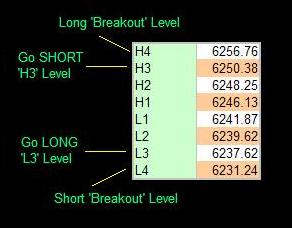
As you can see, trading with the Camarilla Equation is relatively simple. The important levels to note are the 'L3' and 'H3' levels, where you may expect a reversal to occur, and the 'L4' and 'H4' levels that shows you where a major breakout has been confirmed. How you specifically enter a trade depends to a great extent on the way the market opens.
Market Opens INSIDE 'L3'The following applies both to going 'Long' and going 'short'. If the market opens INSIDE the L3 and H3 levels (i.e. BETWEEN the higher H3 and the Lower L3), you must wait for price to approach either of these two levels. Whichever it hits first (L3 or H3) determines your trade.
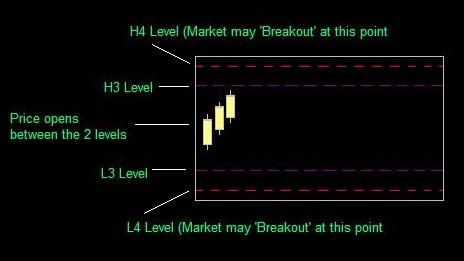
If the HIGHER H3 level is hit, you go SHORT (against the trend) in the expectation that the market is about to reverse. Some traders recommended using the higher 'H4' level as your stoploss point, as a penetration up thru the H4 level actually shows that a major breakout may be under way. I would recommend that you wait for price to bounce back down inside the H3 level again before entering the trade, as you will therefore be technically trading WITH the short-term trend. A fair amount of experience is needed for this style of trading.The opposite, of course applies if the LOWER L3 level is hit first - wait for it to come back up inside the lower L3 level, then go LONG.
Market Opens Outside 'L3'In this case, you wait for the market to move back up thru the L3 level - you will then be trading WITH the trend, and once again, some traders recommended using the L4 level as your stop loss (although perhaps you should use a sensible stop based on your knowledge of your market.)
Taking profits is a matter of personal judgement - just be aware that you WILL want to take profits at some time during the day, because the market is unlikely to 'behave' and stay right-sided for your trade.
Research suggests that these reversals from L3 and H3 happen as often as 4 times out of 5 during intraday trading.
Using the Equation to trade 'breakouts' is also eminently possible, and essentially involves you going LONG if price penetrates UP thru the higher H4 level, or going SHORT if price penetrates DOWN thru the lower L4 level.
Ok so now you know a little about the equation and how to use it, here is what you have all been waiting for so patiently..... The Equation.
H4 = [1.1*(H-L)/2]+CH3 = [1.1*(H-L)/4]+C
H2 = [1.1*(H-L)/6]+C
H1 = [1.1*(H-L)/12]+C
L1 = C-[1.1*(H-L)/12]
L2 = C-[1.1*(H-L)/6]
L3 = C-[1.1*(H-L)/4]
L4 = C-[1.1*(H-L)/2]
Where:
H = Days high
L = Days low
C = Days Close
(All values are for the previous day prior to the trade day)
And now, for forex traders that are using MT4 Platform, there is camarilla indicator for automated calculation and drawing levels. Just download the indicator at link below and put in metatrader/experts/indicator folder, then re run your MT4 Platform and attach the indicator at any charts that you want to use it. Remember, this is not holy grail but can help us to trade and open positions better. Use this as your own risk.
Download link : here
A few days ago, I read an article at ForexFactory.com. It is about a plugin for MetaTrader4, forex trading platform that is used by most of forex trader. It is called "Virtual Dealer Plug-In". I was surprised that MetaQuotes was developing such plug-in to help broker for cheating clients. With this plug-in, brokers could do many things to make an order from client to be failed such as:
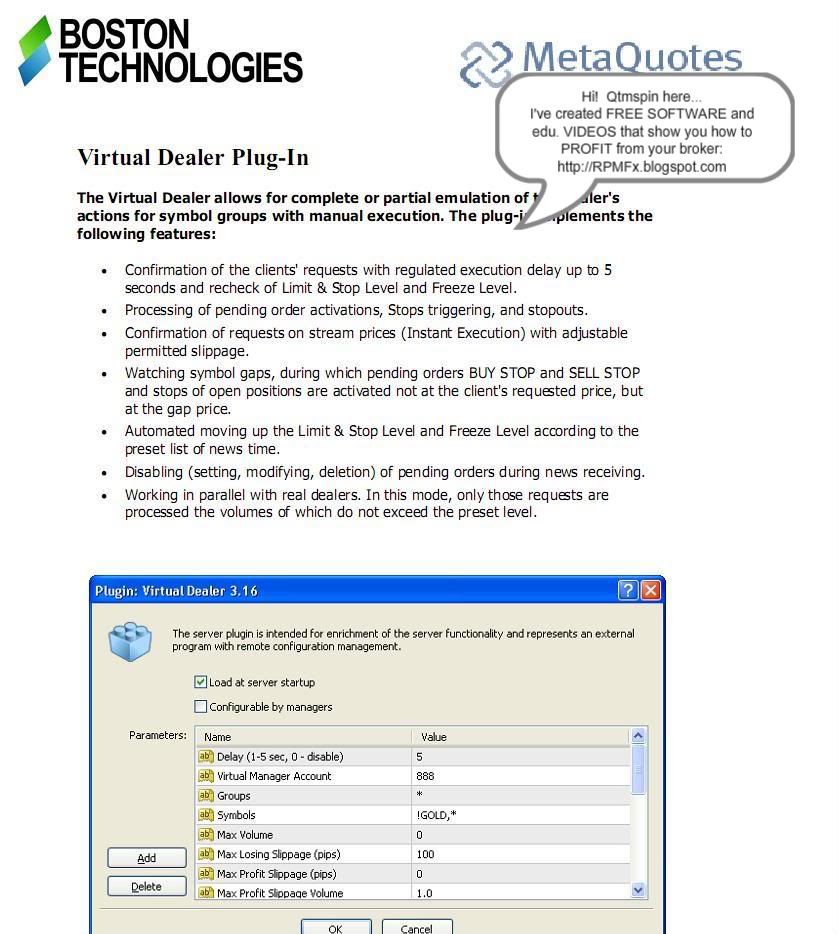
- Confirmation of the clients' requests with regulated execution delay up to 5 seconds and recheck of Limit & Stop Level and Freeze Level.
- Processing of pending order activations, Stop triggering, and stopouts.
- Confirmation of requests on stream prices (Instant Execution) with adjustable permitted slippage.
- Watching symbol gaps, during which pending order BUY STOP and SELL STOP and stops of open positions are activated not at the client's requested price, but at the gap price.
- Automated moving up the Limit & Stop Level and Freeze Level according to the preset list of news time.
- Disabling (setting,modifying,deletion) of pending orders during news receiving.
- Working in parallel with real dealers. In this mode, only those requests are processed the volumes of which do not exceed the preset level.
source : http://www.forexfactory.com/showthread.php?t=70582


